Open-source agent tracing
Agent tracing, without the platform.
A TypeScript library for LangGraph and LangChain. Traces land in your files or AWS account, and a local viewer opens them.
Fits the stack you already run
- LangGraph
- LangChain
- Model Context Protocol
- Claude
- Cursor
- Docker
- Kubernetes
Let Claude Code debug the run
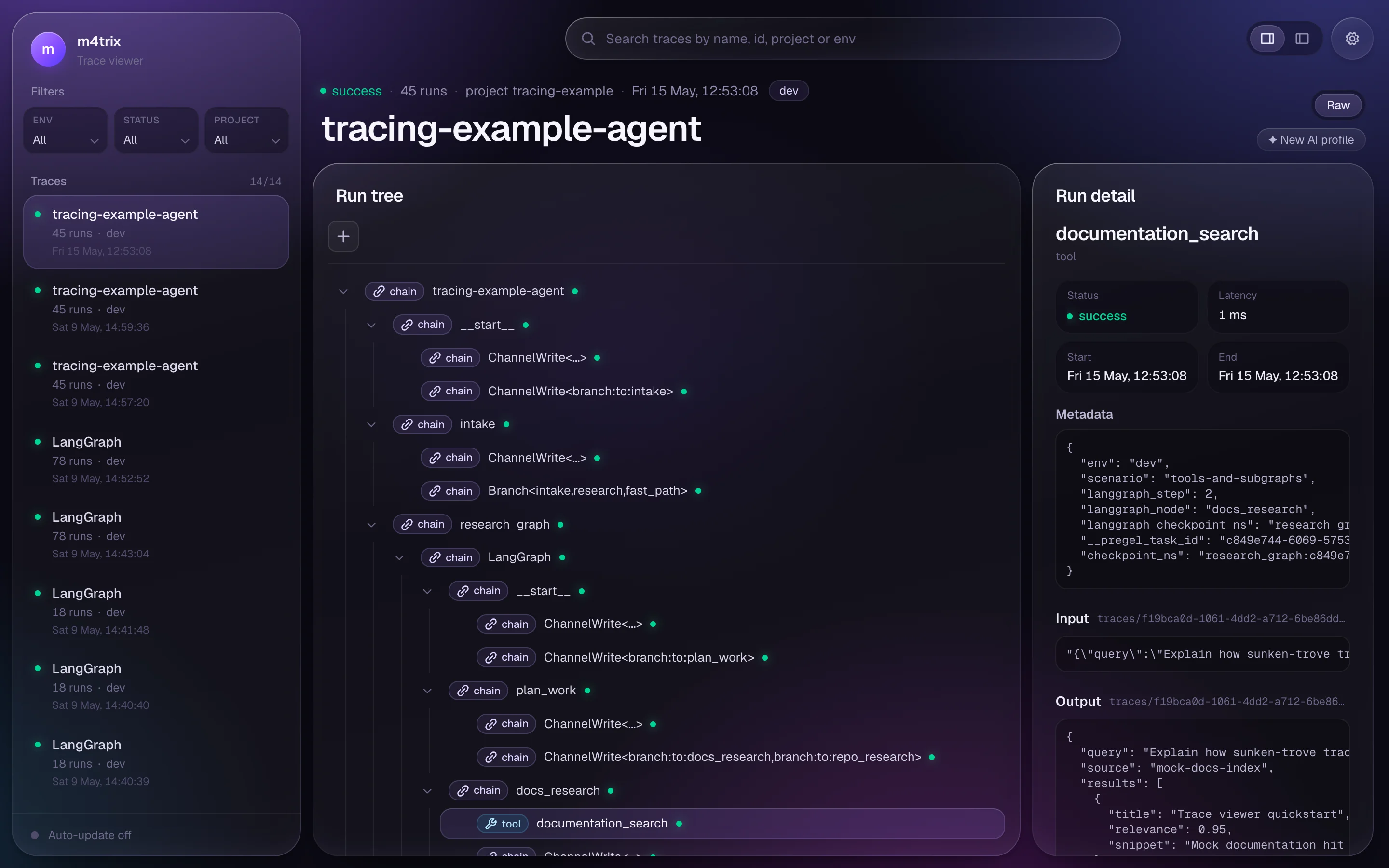
The viewer serves an MCP endpoint on localhost. Claude Code reads the run tree, searches payloads and points at the call that broke.
claude mcp add --transport http \ m4trix-traces http://127.0.0.1:4319/mcp- list_traces
- find_runs
- search_payloads
- get_trace
- get_run
- get_payload
- get_conversation
- analyze_trace
- compare
- annotate
- load_trace_payloads
One callback. Every step recorded.
The tracer speaks the LangChain callback API. Pass it to invoke and every chain, model and tool call lands in ./.traces.
.traces/traces/f19bca0d/runs.ndjson
{"name":"intake","type":"chain","status":"success"}
{"name":"plan_work","type":"chain","status":"success"}
{"name":"documentation_search","type":"tool","status":"success"}
{"name":"repository_search","type":"tool","status":"success"}
{"name":"draft_answer","type":"llm","status":"success"}
{"name":"final_review","type":"chain","status":"success"}
import {  FsPayloadStoreAdapter,  FsStructureStoreAdapter,  TraceStore,  Tracer,  toLangGraph,} from '@m4trix/tracing';
const traceStore = TraceStore.of({  structureStoreAdapter: new FsStructureStoreAdapter({ path: './.traces' }),  payloadStoreAdapter: new FsPayloadStoreAdapter({ path: './.traces' }),});
const tracer = Tracer.from(traceStore).adapt(toLangGraph);
await graph.invoke(input, { callbacks: [tracer] });await tracer.flush();pnpm add @m4trix/tracingnpx @m4trix/trace-viewer \ --adapter fs --path ./.tracesOpen a run, see what happened
Small rows for lists and filters, full payloads when you open a run, and notes that stay with the trace.
Payloads that read like conversations
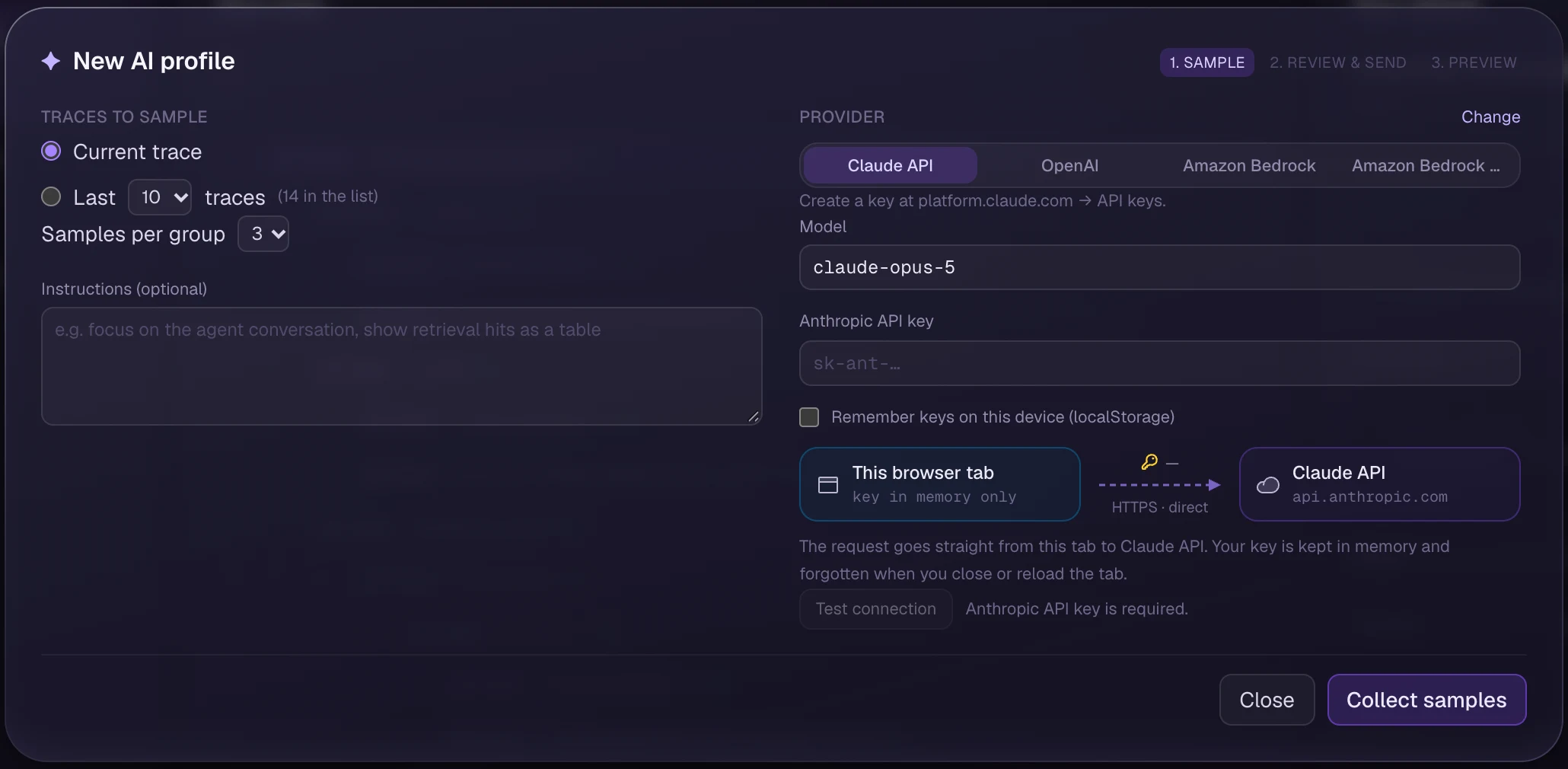
Profiles turn raw JSON into messages, tool calls and tables. A model drafts the mapping from samples of your traces, with your own key, straight from the browser.
Plain files on disk
No sign-up, no API key, no upload queue. Grep it, commit a fixture, or mount it in Docker.
└─ f19bca0d/
├─ trace.json
├─ runs.ndjson
└─ payloads/
Split storage, one store
Structure rows stay small, so lists and filters are fast. Prompts and completions are blobs, fetched by ref when you open a run. The adapters that wrote them serve both back.
Structure rows (files or DynamoDB)
Payload blobs (files or S3)
Review in place
Annotate traces and single runs after the fact. Notes live next to the structure rows, not in another tool.
annotation: { review: 'approved' }Start on a laptop. Ship to AWS when you need to.
Same Tracer, same viewer at every stage. Only the adapters change.
Write locally
Filesystem adapters write to a folder. On a laptop that is the whole setup.
Ship with a sidecar
A companion container uploads payloads before structure, so the app needs no AWS credentials.
Read from AWS
The same viewer and MCP server read straight from your account.
Six primitives. No platform.
Swap any adapter without touching the tracer or the viewer.
Drop-in LangGraph and LangChain callbacks
Tracer.from(traceStore) implements the callback surface LangGraph expects. Pass tracer.adapt(toLangGraph) to callbacks. Every chain, LLM, tool, and retriever span lands in your store without rewriting agent code.- Handles chain, LLM, chat model, tool, and retriever events
- Batches pending runs on flush for efficient writes
- Typed LangGraph adapter via toLangGraph
import { Tracer, toLangGraph } from '@m4trix/tracing';
const tracer = Tracer.from(traceStore);const lgTracer = tracer.adapt(toLangGraph);
await graph.invoke(input, { callbacks: [lgTracer] });await lgTracer.flush();
Questions
Does anything leave my machine?
Not by default. The filesystem adapters write to a folder you choose. Data only moves if you configure the S3 and DynamoDB adapters or run the sidecar. AI profiles call the model provider directly from your browser, with your key.
Do I have to use LangGraph?
No. The Tracer implements the LangChain callback methods without importing LangChain, so anything that emits those callbacks works. LangGraph gets a typed adapter through toLangGraph.
How is this different from LangSmith or Langfuse?
Those are platforms: a hosted service, or a database and web app you operate. m4trix tracing is a library. Traces are files or rows in your own AWS account, and the viewer is a CLI you start when you need it.
Is it ready for production?
The sidecar pattern is built for it: the app writes locally and a companion container ships to S3 and DynamoDB. Sampling, PII redaction, viewer auth and retention policies are not included yet.
What does it cost?
Nothing. It is MIT licensed with no seats or usage tiers. You pay only for the storage you choose to use.
Part of the m4trix toolkit
Each package works on its own. Together they share one TypeScript model.